
Best kitchen display system ( KDS ) Toronto Canada
Keep every order visible from the moment it reaches the kitchen until it is ready to serve. LimeOrder KDS routes tickets to the right preparation station, tracks timing, alerts staff to delays and moves completed items into the serve workflow.
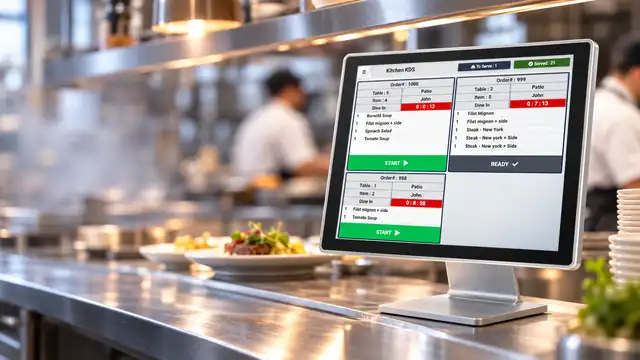
Send each item to the KDS that should prepare it.
Configure separate kitchen display stations so cooks, bartenders and expediters only see the orders relevant to their work.
Route cooked entrées, grilled items, fried items and other hot preparation tickets to the hot kitchen screen.
Send salads, cold appetizers, desserts and prep-station items to a dedicated cold kitchen KDS.
Send drinks and bar items directly to the bar KDS instead of mixing them into kitchen production.
When preparation is complete, ready items can leave the kitchen station and move to a serve KDS for pickup.
Organize completed delivery and takeout orders in a separate handoff view for faster dispatch.
Define the timing rules your kitchen should follow.
Use configurable KDS timing thresholds to show when an order is still within target, approaching delay or already late.
KDS Preparation Time
From POS order to kitchen preparation to serve.
The KDS updates as the order progresses, helping staff see what is new, what is being prepared and what is ready for the next station.
Order sent to kitchen
Orders appear on the assigned KDS as soon as they are sent from the POS to the kitchen.
New items stay visible
If new items are added to an existing table, the newly received items appear on KDS so the kitchen can prepare the change.
Preparation is tracked
Staff start the ticket and timing rules show short-delay and late-order conditions based on your settings.
Ready moves to Serve
When an item is marked ready, it can be removed from its preparation KDS and sent to the Serve KDS for pickup or delivery handoff.
See order status across the operation at a glance.
Each KDS can surface the current workload so managers and staff know where orders are in the workflow.
New orders
See the number of newly received orders waiting to be started.
Under preparation
Track how many orders are actively being prepared.
Prepared to serve
Know how many completed tickets are waiting for pickup or service.
Served
See the number of completed orders already marked served.
Order timers
Visual timers make delayed tickets easier to identify during busy periods.
Station workload
Separate KDS stations keep each preparation area focused on its own queue.
1 Cheese
1 Salad
1 Drink
1 Medium
Kitchen ticket in progress
Interested in LimeOrder KDS?
Tell us about your business and our team will follow up with the right LimeOrder setup.
Keep your kitchen and front of house synchronized.
See how LimeOrder KDS can organize preparation stations, timing, ready-to-serve orders and live kitchen status in one connected restaurant POS workflow.