
◷
Store working hoursShow ordering availability based on the hours each store actually operates.
Take orders online without separating your website from your day-to-day POS operation. LimeOrder connects your online store, product catalogue, ordering, payments, pickup, delivery and location selection with the POS your team already uses.
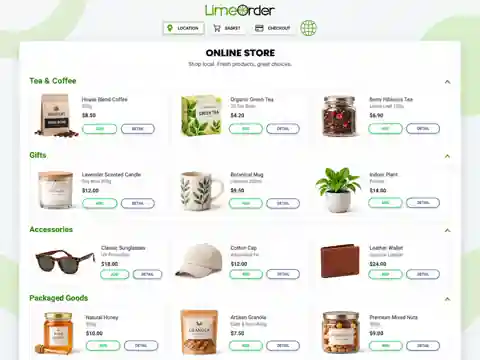
Run the customer-facing online shop and the in-store workflow as one connected operation instead of maintaining separate systems.
Show ordering availability based on the hours each store actually operates.
Define holidays and closure dates so customers see accurate online ordering availability.
Keep online orders connected to the LimeOrder POS workflow used by staff at the store.
Alert the POS system when a new online order arrives so staff can respond quickly.
Automatically send eligible restaurant orders to a kitchen printer or Kitchen Display System when the order is placed.
Organize products, menu items, descriptions, pricing and customer-facing ordering choices in one catalogue.
Show customers clear product or menu images to help them browse and choose online.
Let restaurant customers customize meals, toppings, sizes and other modifier choices before checkout.
Customers can add items, remove items and review their basket before placing an order.
Support pay-at-checkout workflows as well as payment at pickup or delivery according to your setup.
Display important store notices, special instructions or ordering information directly on the online ordering page.
Let customers select the correct location before ordering—ideal for franchises and multi-location businesses.
The same online store foundation can be configured around the way a retail store, restaurant or small business actually sells.
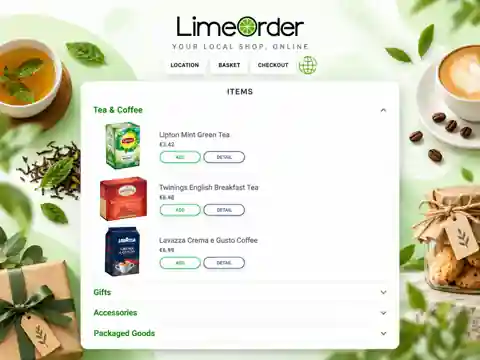
Sell products online from retail stores, boutiques, grocery shops and other small businesses while keeping online orders connected to LimeOrder POS.
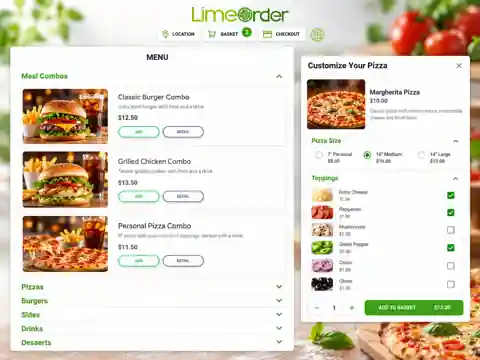
Turn the same platform into a restaurant online ordering system built around kitchen fulfilment.
Keep the ordering flow simple for customers while making sure store and kitchen staff receive the information they need.
For multi-location businesses, the customer selects the location they want to order from.
Products, images, modifiers and the basket make it easy to customize and review the order.
The store is alerted when the new synchronized online order arrives.
Restaurant orders can route to the kitchen printer or KDS while retail teams prepare pickup or delivery.
Customers can select a location when ordering online, while each store can maintain its own working hours, holidays, alerts and fulfilment workflow.
Common questions about connecting online ordering with LimeOrder POS.
Yes. Online orders are synchronized with LimeOrder POS so your staff can manage incoming orders as part of the same store workflow.
Yes. Restaurant orders can be configured to route automatically to a kitchen printer or Kitchen Display System (KDS) after the order is placed.
The store can support pay-at-checkout workflows as well as payment at pickup or delivery depending on how the business is configured.
Yes. Customers can select the appropriate store location when placing an online order, making the platform suitable for franchises and multi-location businesses.
No. LimeOrder's online store can be used by retail stores, restaurants and other small businesses. The catalogue, ordering and fulfilment workflow can be adapted to each category.
Tell us about your retail store, restaurant or small business. We can show you the catalogue, ordering, checkout, pickup, delivery, POS alerts, KDS routing and multi-location workflow that fits your operation.
See how LimeOrder can connect online ordering, products, restaurant modifiers, checkout, pickup, delivery, multi-location selection and in-store fulfilment for your business.